

Introduction
Structured Query Language (SQL) is a powerful tool for managing and analysing data in relational databases. While many SQL tutorials cover the basics like SELECT, INSERT, UPDATE, and DELETE commands, this blog post will delve into advanced SQL techniques crucial for complex data analysis. By mastering these techniques, you will be equipped to handle intricate data queries, streamline your data processing tasks, and improve the efficiency of your data-related projects.
Prerequisites
Before we dive in, ensure you have the following prerequisites:
- Basic knowledge of SQL syntax and commands.
- Familiarity with database concepts, such as tables, rows, and columns.
- Access to a SQL database (e.g., MySQL, PostgreSQL, SQL Server) for hands-on practice.
Common Table Expressions (CTEs)
Overview
Common Table Expressions (CTEs) are temporary result sets that you can reference within a SELECT, INSERT, UPDATE, or DELETE statement. They improve the readability and organisation of complex queries.
Syntax and Examples
The basic syntax for a CTE is as follows:
WITH cte_name AS (
    SELECT column1, column2
    FROM table_name
    WHERE condition
)
SELECT *
FROM cte_name;
Example:
WITH SalesCTE AS (
    SELECT ProductID, SUM(Quantity) AS TotalSales
    FROM Sales
    GROUP BY ProductID
)
SELECT p.ProductName, s.TotalSales
FROM Products p
JOIN SalesCTE s ON p.ProductID = s.ProductID;
Use Cases
CTEs are particularly useful for:
- Breaking down complex queries into simpler parts.
- Recursively querying hierarchical data.
- Improving performance with better query optimisation.
Window Functions
Overview
Window functions allow you to perform calculations across a set of table rows that are related to the current row. They are invaluable for analytics and reporting tasks.
Syntax and Examples
The syntax for window functions includes the OVER() clause:
SELECT column1,
       SUM(column2) OVER (PARTITION BY column3 ORDER BY column4) AS RunningTotal
FROM table_name;
Example:
SELECT EmployeeID,
       Salary,
       RANK() OVER (ORDER BY Salary DESC) AS SalaryRank
FROM Employees;
Use Cases
Window functions are ideal for:
- Running totals and cumulative sums.
- Ranking and percentiles.
- Moving averages.
Recursive Queries
Overview
Recursive queries are powerful for dealing with hierarchical data structures, such as organisational charts or category trees.
Syntax and Examples
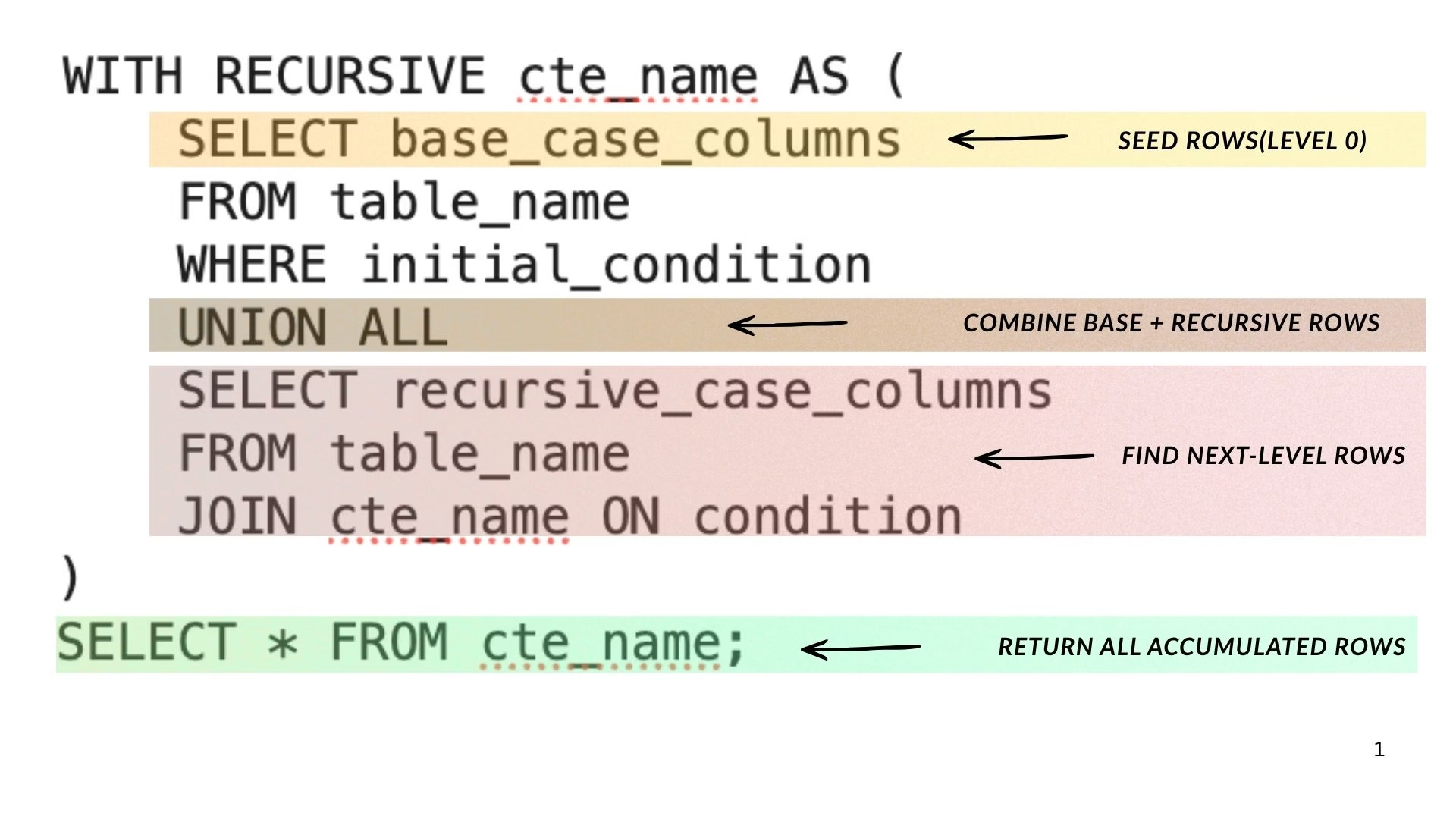
The basic structure of a recursive CTE is as follows:
WITH RECURSIVE cte_name AS (
    SELECT base_case_columns
    FROM table_name
    WHERE initial_condition
    UNION ALL
    SELECT recursive_case_columns
    FROM table_name
    JOIN cte_name ON condition
)
SELECT * FROM cte_name;
Example:
WITH RECURSIVE EmployeeHierarchy AS (
    SELECT EmployeeID, ManagerID, EmployeeName
    FROM Employees
    WHERE ManagerID IS NULL
    UNION ALL
    SELECT e.EmployeeID, e.ManagerID, e.EmployeeName
    FROM Employees e
    INNER JOIN EmployeeHierarchy eh ON e.ManagerID = eh.EmployeeID
)
SELECT * FROM EmployeeHierarchy;
Use Cases
Use recursive queries for:
- Navigating tree structures.
- Generating reports that require hierarchical data.
Subqueries
Overview
A subquery is a query nested inside another SQL query. They can be used in SELECT, INSERT, UPDATE, and DELETE statements.
Syntax and Examples
The syntax for a subquery can vary but typically looks like this:
SELECT column1
FROM table_name
WHERE column2 = (SELECT column2 FROM other_table WHERE condition);
Example:
SELECT ProductName
FROM Products
WHERE ProductID IN (SELECT ProductID FROM OrderDetails WHERE Quantity > 10);
Use Cases
Subqueries are useful for:
- Filtering results based on the results of another query.
- Performing calculations to include in the main query.
Set Operations
Overview
Set operations allow you to combine the results of two or more queries. The primary set operations in SQL are UNION, INTERSECT, and EXCEPT.
Syntax and Examples
The basic syntax for a UNION operation is:
SELECT column1 FROM table1
UNION
SELECT column1 FROM table2;
Example:
SELECT ProductName FROM Products
UNION
SELECT ProductName FROM DiscontinuedProducts;
Use Cases
Set operations are beneficial for:
- Merging datasets.
- Finding common or unique records across different tables.
Troubleshooting Common Issues
- Performance Issues: If your queries are running slow, consider indexing your tables, especially on columns used in JOINs and WHERE clauses.
- Syntax Errors: Double-check your SQL syntax, particularly in complex queries with nested CTEs or subqueries. Use a SQL editor with syntax highlighting to help identify issues.
- Data Type Mismatches: Ensure that the data types in your queries are compatible, particularly when using set operations or subqueries.
Conclusion
Mastering advanced SQL techniques such as Common Table Expressions, Window Functions, Recursive Queries, Subqueries, and Set Operations will significantly enhance your data analysis capabilities. These tools will not only streamline your workflow but also empower you to extract valuable insights from complex datasets.
As you continue to hone your SQL skills, remember to practice these techniques in real-world scenarios. By doing so, you will solidify your understanding and become a proficient SQL developer capable of tackling any data challenge.
This blog post is designed to serve as a comprehensive guide for both aspiring and experienced SQL developers. Whether you are looking to refine your skills or expand your knowledge, these advanced SQL techniques are essential for professional development in the field of data analysis. Happy querying!